← Knowledge baseCONTROLS

Everything mouse and keyboard can do — from selecting to drawing a route. The cursors come from the game itself, the screenshots from real matches.

Selecting
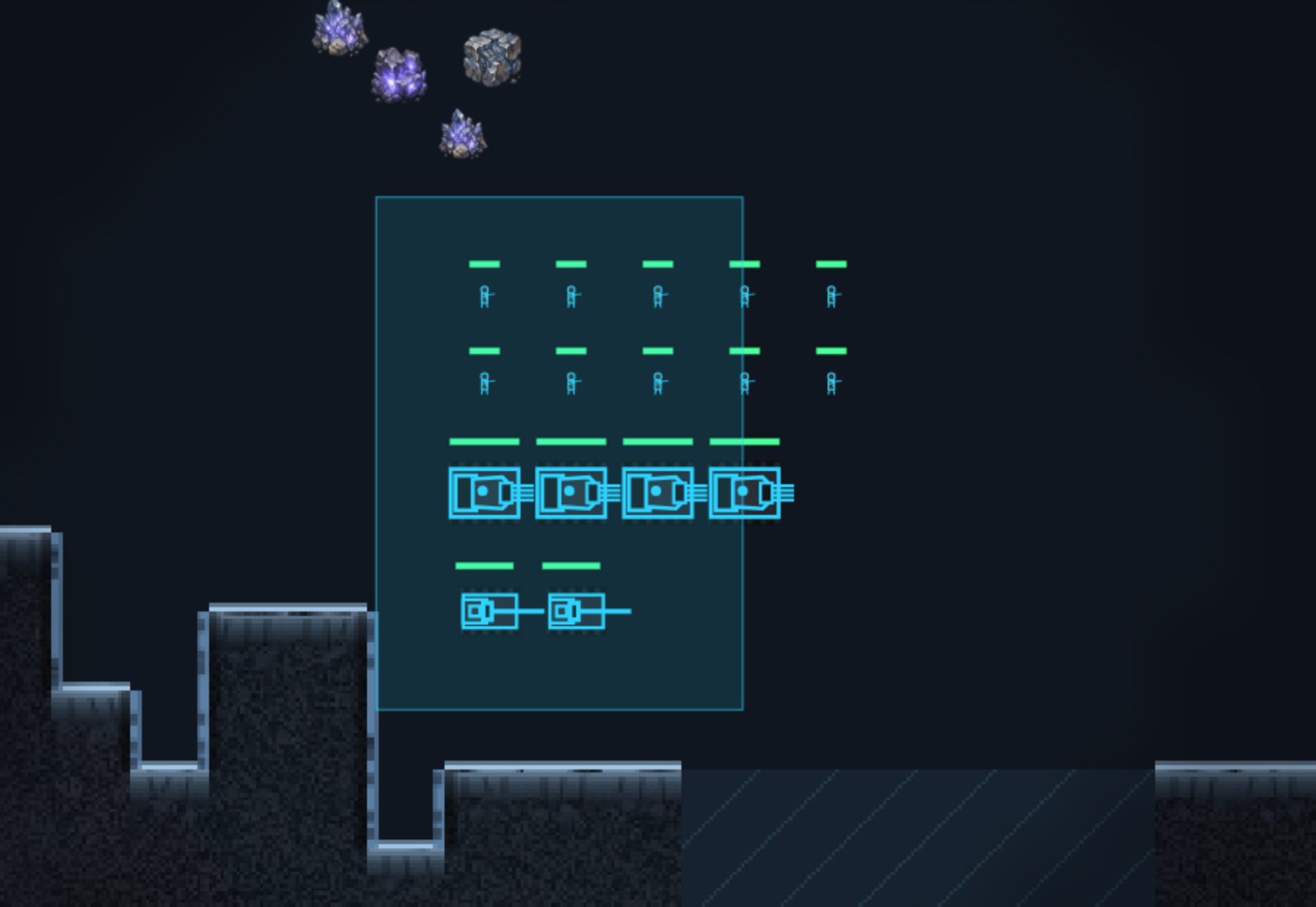
A drag box takes everything inside it. If fighters are among them, harvesters are left out — you meant to send the army, not the economy.
Left click
Select one unit or building.
Drag
Drag a box — everything inside is selected.
Double-click
Select every unit or building of the same type currently on screen.
CTRL+Left click+held
Map ping for your allies. A short Ctrl-click calls "attention"; drag out of the centre to pick attack or defend. Works on the minimap too.
SHIFT+Left click
Add to or remove from the selection.
Left click+on a row of the type list
Narrow the selection to that type. Right click removes it.

Giving orders

There is no order button: right click reads whatever is under the cursor. The cursor tells you what you are about to do before you click.

Right click+on ground
Move there.
Right click+on an enemy
Attack — and pursue until the target falls.
CTRL+Right click
Attack move: advance and engage anything along the way. The force stays in a band around its line of march — nobody chases a scout across the map. How wide that band is you set below the selection.
CTRL+ALT+Right click
Attack move without giving up the formation — the force advances as a block and fires on the way.
ALT+Right click+on own unit
Guard: follow and defend.
ALT+Right click+on open ground
Formation move: the group keeps its shape and travels at the slowest unit's pace.
SHIFT+Right click
Queue the order instead of replacing — as many as you like.
Right click+anywhere into an ore field
Harvesters mine exactly there — not at the centre of the field but at the spot you clicked. After that they shuttle to the refinery on their own.
Right click+on the workshop
Dock the vehicle for repairs.
Right click+on transport or bunker
Board. Press E to unload everyone.
Right click+on a wreck
Salvage — Collective and Bloom only; for the other three a wreck is just debris.
Right click+on a building (combat engineer)
Capture an enemy building, repair a damaged own one.
Right click+on the unit itself (MCV, artillery)
Deploy or pack up again.
Right click+on the refinery (harvester)
Send there to unload.
— same, dock occupied
The cursor warns beforehand: another harvester is already waiting there.

Stance

Every combat unit has a stance — it decides what happens without orders. Change it in the bar below the selection.

Passive
Fires only at what is already in range. Never advances.
Neutral
Default: engages what it sees, but pursues only on a short leash and then returns.
Aggressive
No leash — pursues to the end and only then returns.

Buttons below the selection

What appears here depends on what is selected. The stance bar is always there, the rest depends on the unit.

Narrow · Medium · Wide
How far an attack move may swing out sideways, as a share of vision range. Medium is the default.
Group · Single
In group mode the force concentrates fire on one target; single lets a unit act on its own again.
Attack · ignore walls
Whether a unit shoots through a wall or moves past it.
Deploy
Set up and pack down siege equipment. Deployed it hits many times harder but cannot move.
Morph
The morph unit switches shape. The whole selection changes into the same form together.
Formation
The five shapes can be picked directly here too — the same as ALT and the mouse wheel.
Unload
Puts every passenger out on the spot — including bunkers, where the E key does not work.
Gate state
Hold selected gates open, closed, or back on automatic.
Repair threshold
From what damage on the workshop pulls a vehicle in by itself.

Managing buildings

These three buttons start a click-a-target mode: press the button, then click the buildings. It stays on until you click empty ground, right-click or press ESC.

Repair
Repair a building. Costs a share of its build price.
Sell
Tear a building down and get part of it back. You are asked first, the last construction yard cannot go, and the Bloom has neither option.
Power
Take a building off the grid to save power. It still counts as a prerequisite but produces nothing.
Missile silo: pick target
You click the target. For the Aegis Order it takes two clicks: start and end of the swathe.

Formation

Hold the right button and drag: the force lines up facing that way. ALT plus the mouse wheel switches the shape — the next move keeps it.
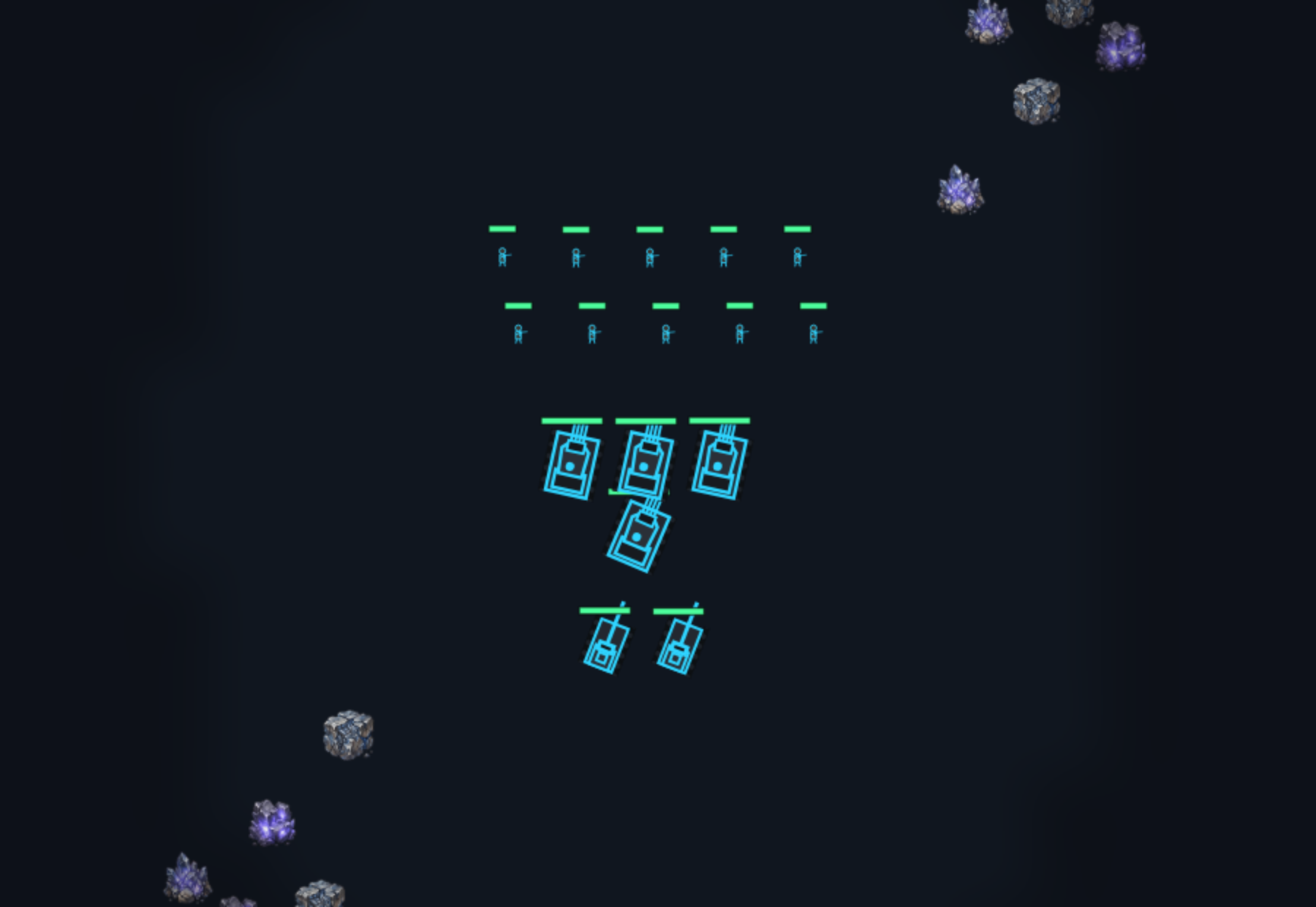
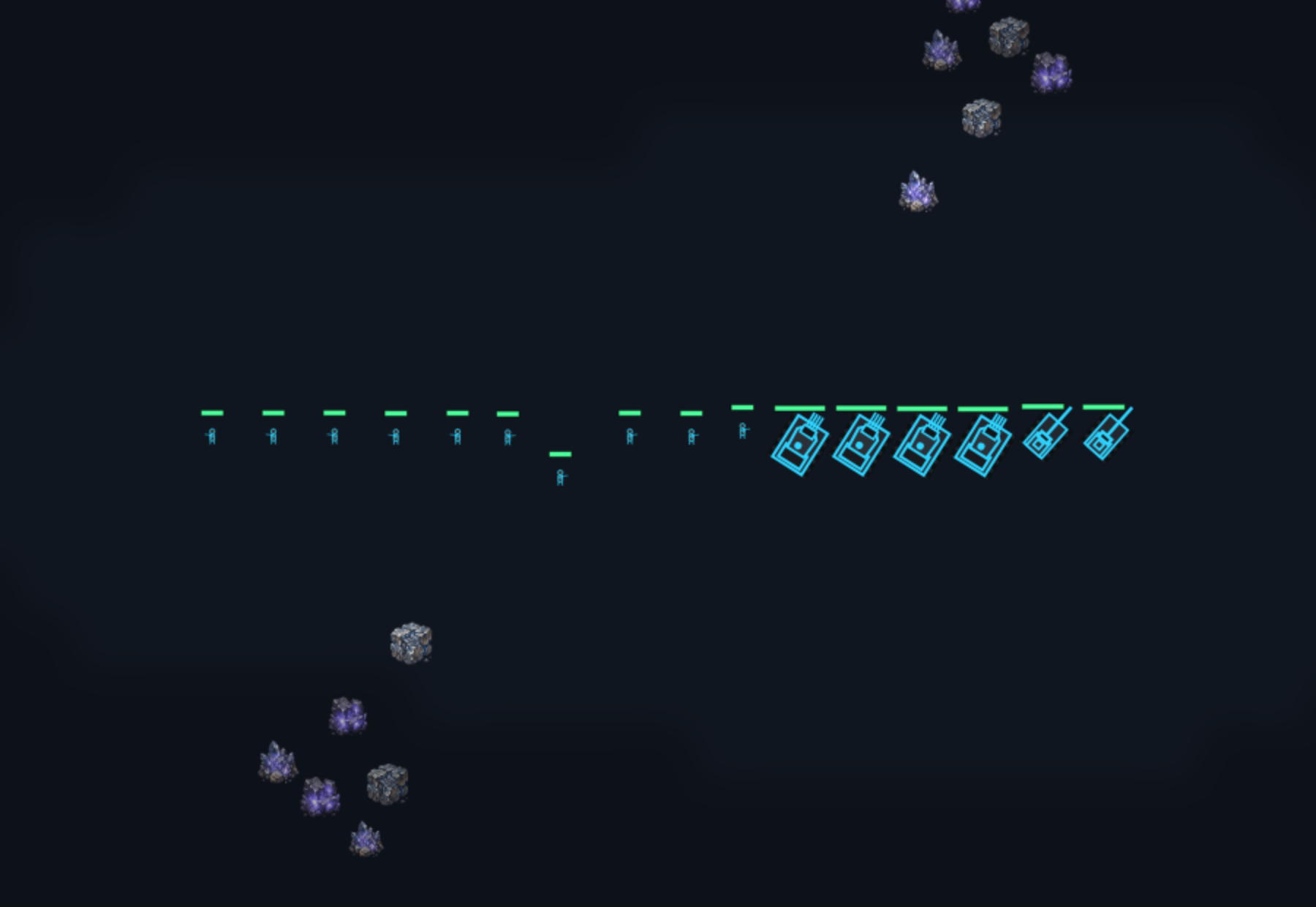
BAENDER Default. Staggered by role: infantry in front, vehicles behind, then siege, support at the back.
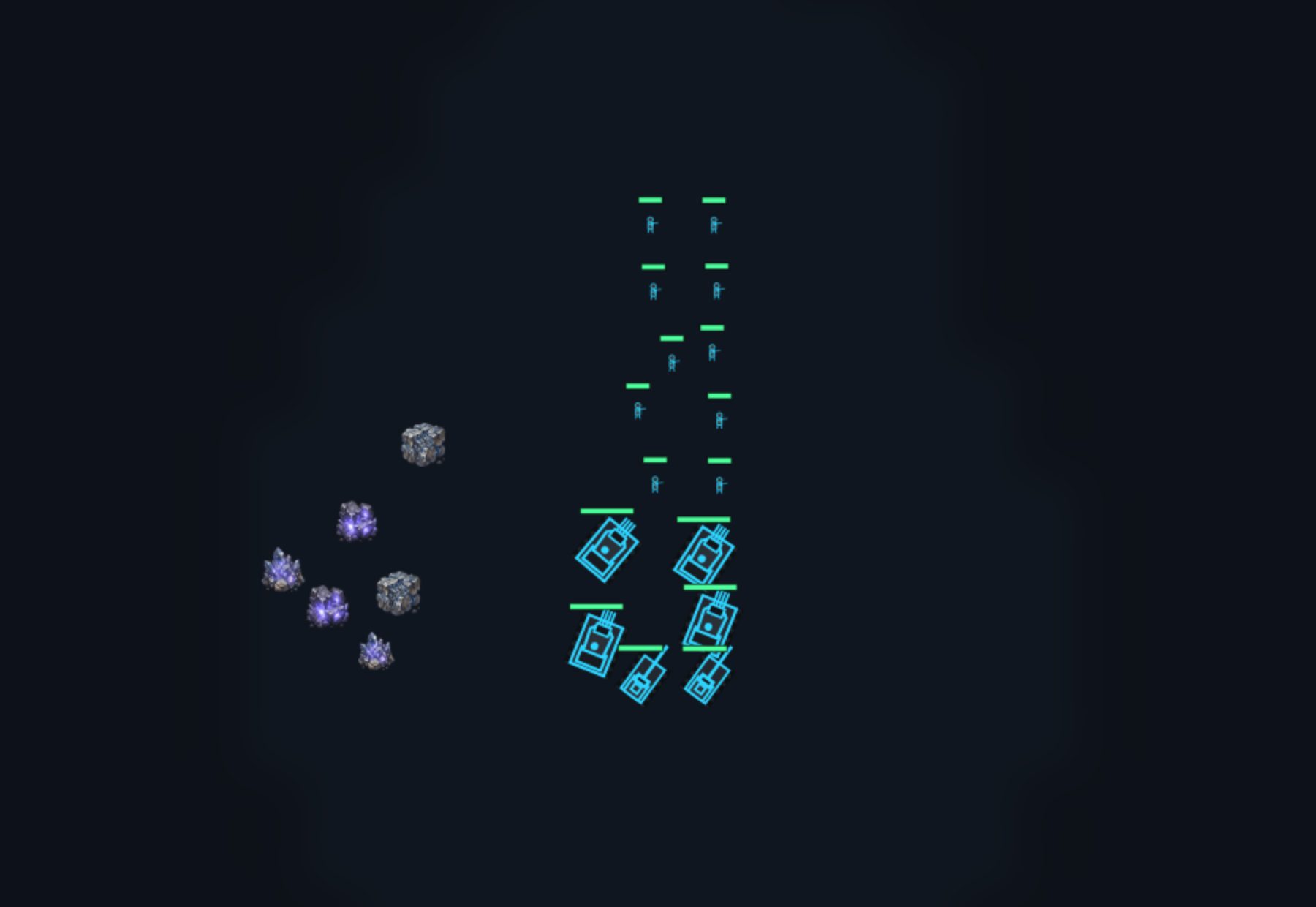
LINIE Wide front: everyone can fire at once. For open ground — poor through chokepoints.
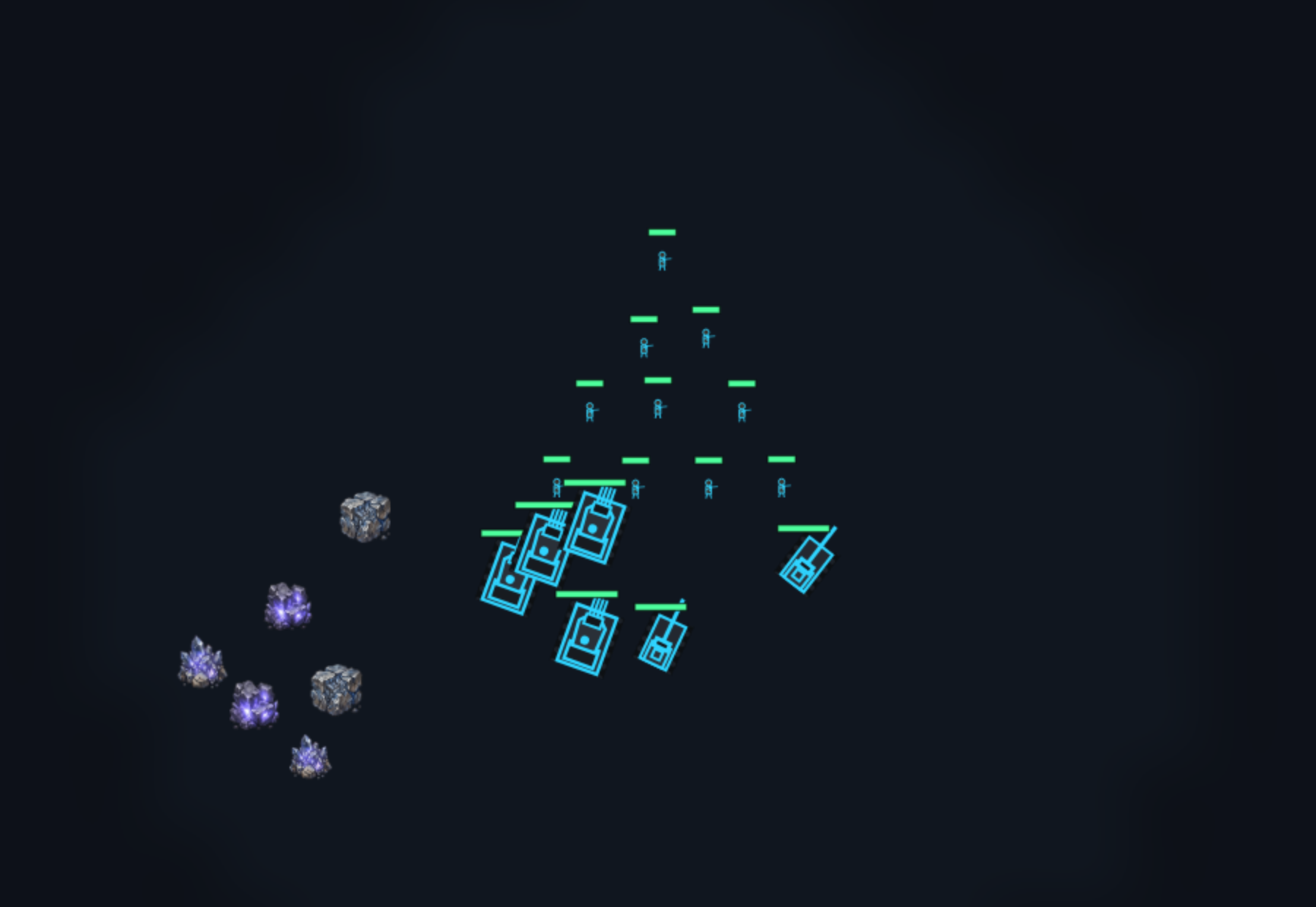
KEIL Arrowhead first. For breaking through: the tip takes the first fire, the rest fans out behind.
KOLONNE Single file. The marching shape for narrow paths — gets through where a line would jam.
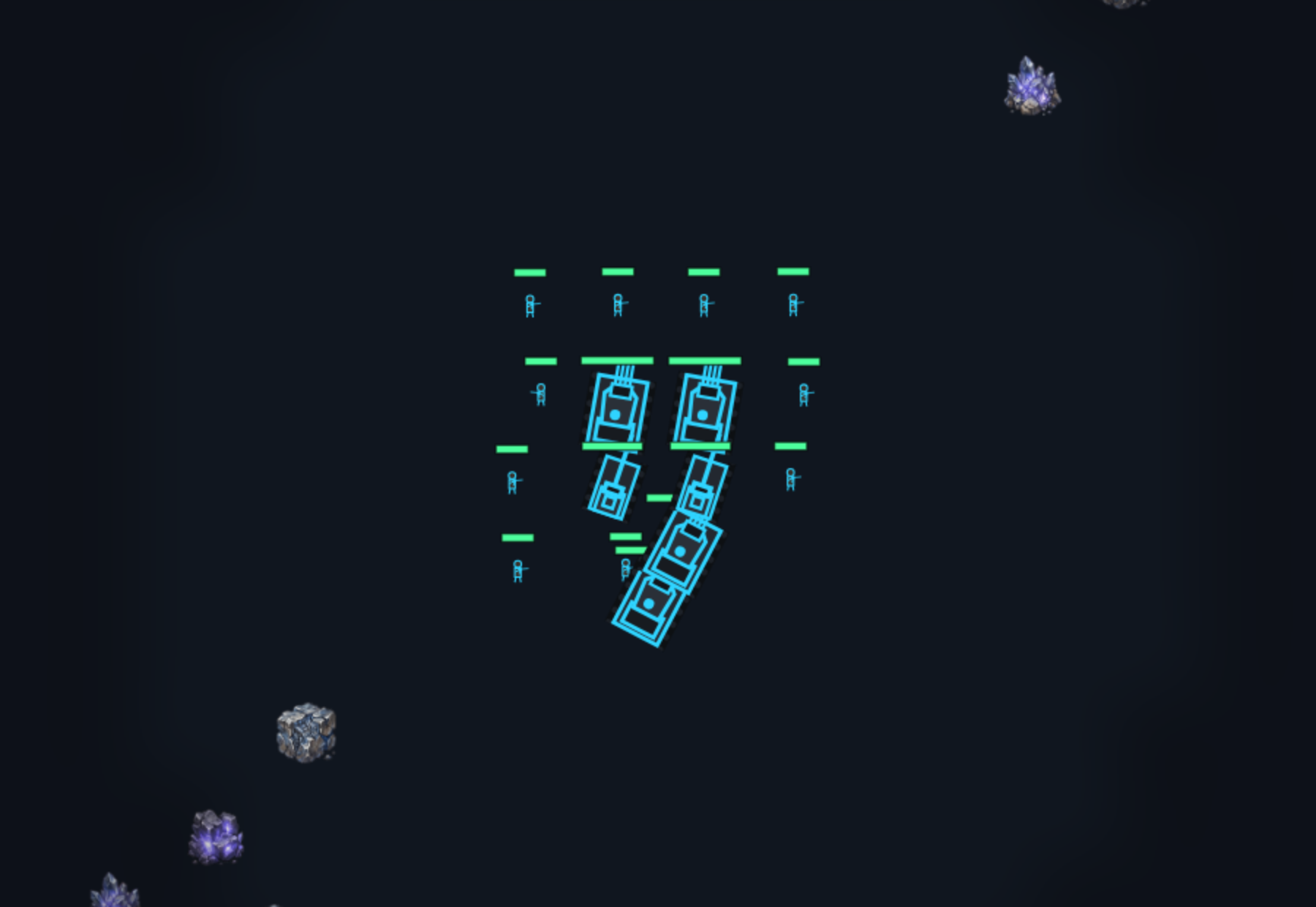
BOX Closed square with the vulnerable in the middle. For marching through unsafe ground.
Right click+hold and drag
Line up facing the direction you dragged.
ALT+Mouse wheel
Switch shape.

Routes

Hold ALT, then tap P or Z once — in that order. A patrol collects your clicks and sets off when you release ALT; a drawn path is traced with the mouse held down and sets off when you let go.
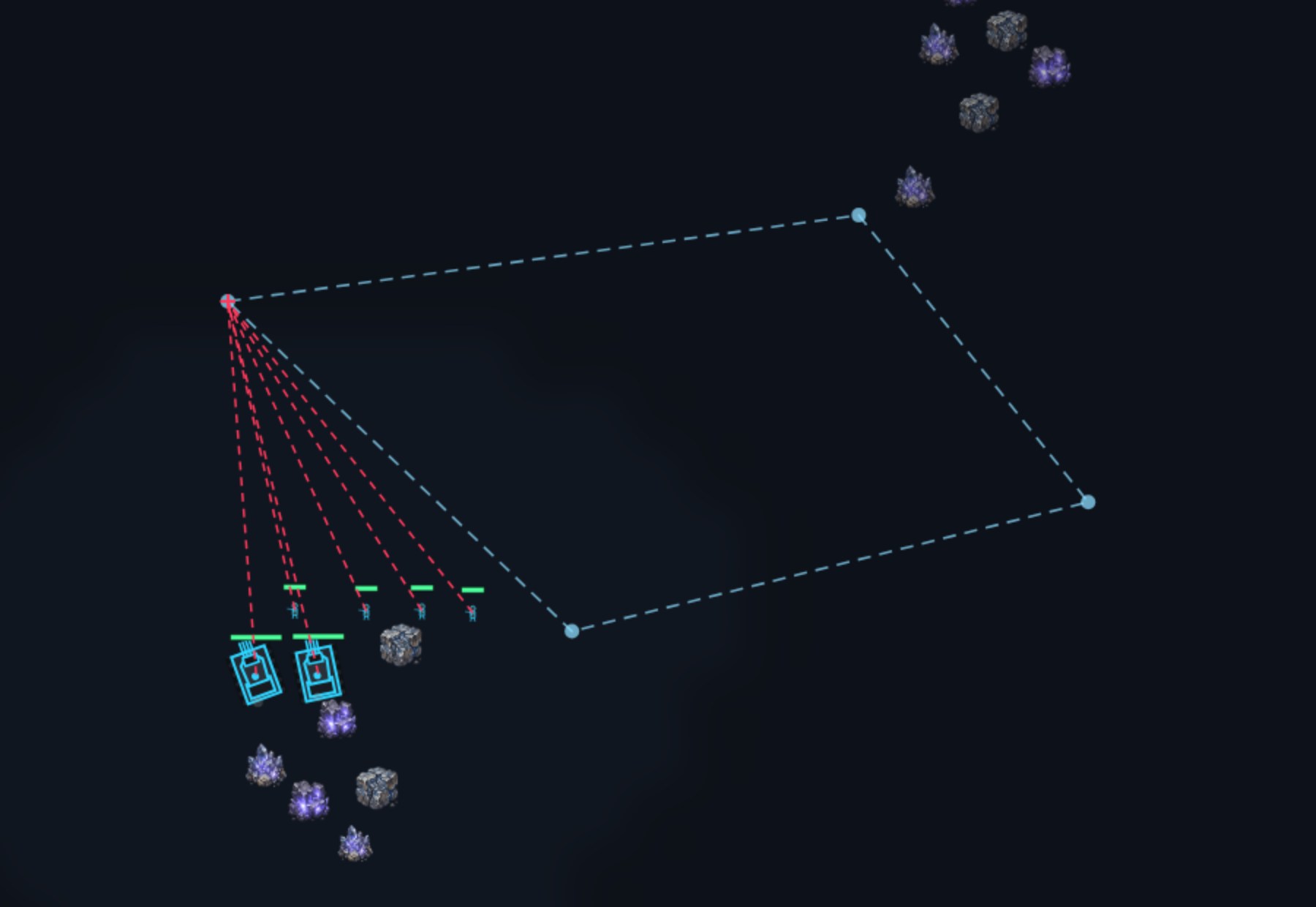
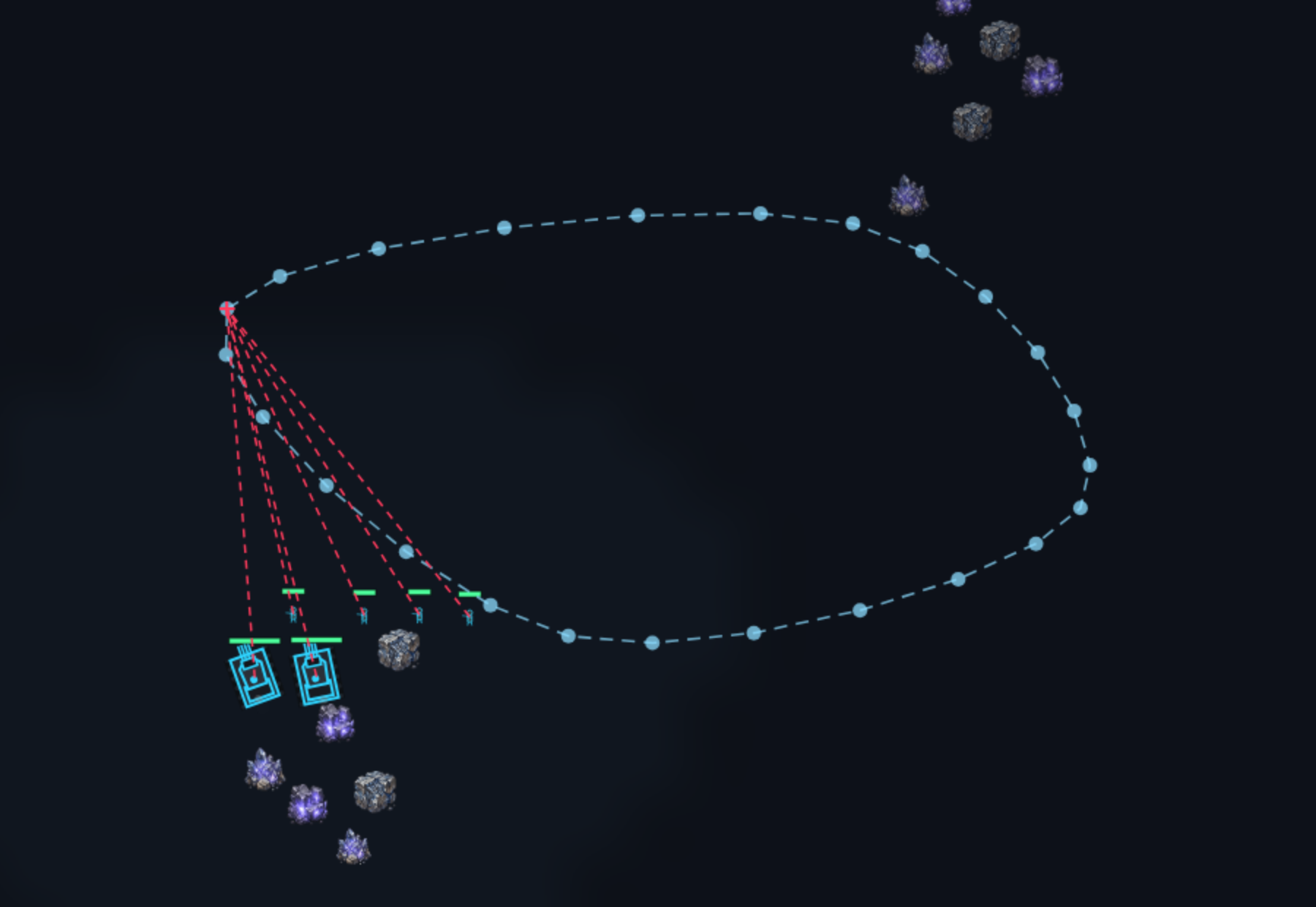
Patrol: the force walks the loop endlessly and engages whatever it meets.
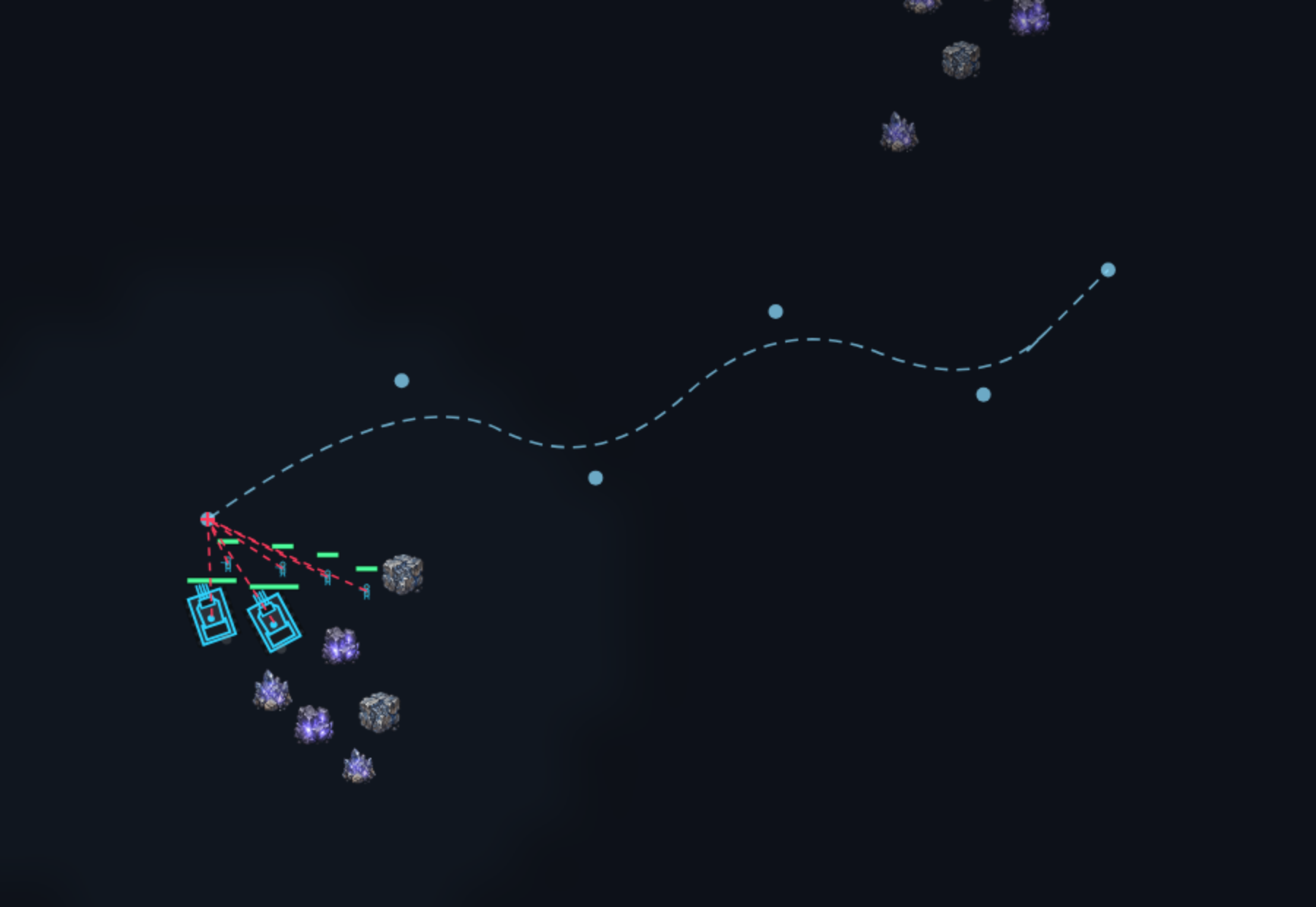
Rounded patrol: the same stations, but a smooth curve between them instead of straight legs. Tap P a second time to switch.
Drawn path: the force follows exactly that line — around a position instead of straight through it.
ALT+P
Set a patrol loop.
ALT+P P
P a second time: rounded patrol (again to switch back).
ALT+Z
Draw a path freely.

Building and production

SHIFT++ letter
Building from the build bar. The letter is printed on the button.
CTRL++ letter
Unit from the production row.
SHIFT+while placing
Keep placing mode open for several in a row.
Left click+Left click+for wall or gate
The first click sets the start, the second builds the run. With SHIFT it becomes a corner and continues from there.
Right click+on a queued outline
Cancel a queued build order.
Right click+held one second, on a building under construction
Cancel the build. Half of what you spent comes back; a short click does nothing here.
Left click+on a locked button
A locked button does not disappear, it stays greyed out — its tooltip names the missing research and its price. A click starts exactly that, and specifically the next reachable step of the chain, not the end node far behind it. Applies to units and buildings alike.
Right click+on a unit button
Take the latest order of that type out of the queue.
Right click+on one of your production buildings
Set as primary — everything you order comes from there. Visible once you own two of the same type.
Right click+with a production building selected
Set the rally point. Right click the building itself clears it.

Research window

Open it from the "Research" tab on the build bar or from the button on a selected tech center. The tree is larger than the window — and it has no scrollbars: you drag it.

Hold and drag
Move the view. You drag the content: pulling right brings the left part of the tree closer.
Mouse wheel
A second way through the tree, vertically. It is not a zoom — the tree keeps its size.
SHIFT+Mouse wheel
The same, horizontally.
Arrows at the edges
They show which directions still hold more tree, and stick to the window edge. When one disappears, that side is done.
Left click+on a node
Queue the research. If it will not go, a message says why — done, already queued, prerequisite open or building missing.
Right click+on a node
Take a queued research back out of the queue.

Groups, camera, overview

CTRL+or+SHIFT++ digit
Store the selection as a control group. Ten groups, 0 to 9.
Digit
Recall the group. Twice in quick succession jumps the camera there.
W A S D+or arrow keys
Move the camera. The mouse pushes it at the screen edge too.
Mouse wheel
Zoom in and out.
Left click+on the minimap
Camera jumps there. Hold to pan along.
Right click+on the minimap
The same order as on the map — move, attack, unload — without having to look there.
Left click+on a status chip
Harvesters cycles to the next idle one and selects it, production to the next building without an order, army to the centre of your force.
SPACE
Jump to the latest attack alert or ally ping.
HOME
Jump to your command center.
E
Unload a transport: every passenger gets out on the spot. The key does not work on bunkers — there the button in the selection panel unloads.
F
Toggle fullscreen.
ESC
Cancels whatever is open — formation, placement, target picking, a started ping, the open codex. With nothing open it opens the menu.